

Secure MCP with Social Logins
Scalekit supports a variety of social connections out of the box, such as Google, Microsoft, GitHub, GitLab, LinkedIn, and Salesforce. This section focuses on how to use Google authentication, and the same process can be used for other social connections.
Before you start
Section titled “Before you start”Please make sure you have implemented MCP auth with any of these examples.
Configure Google connection
Section titled “Configure Google connection”-
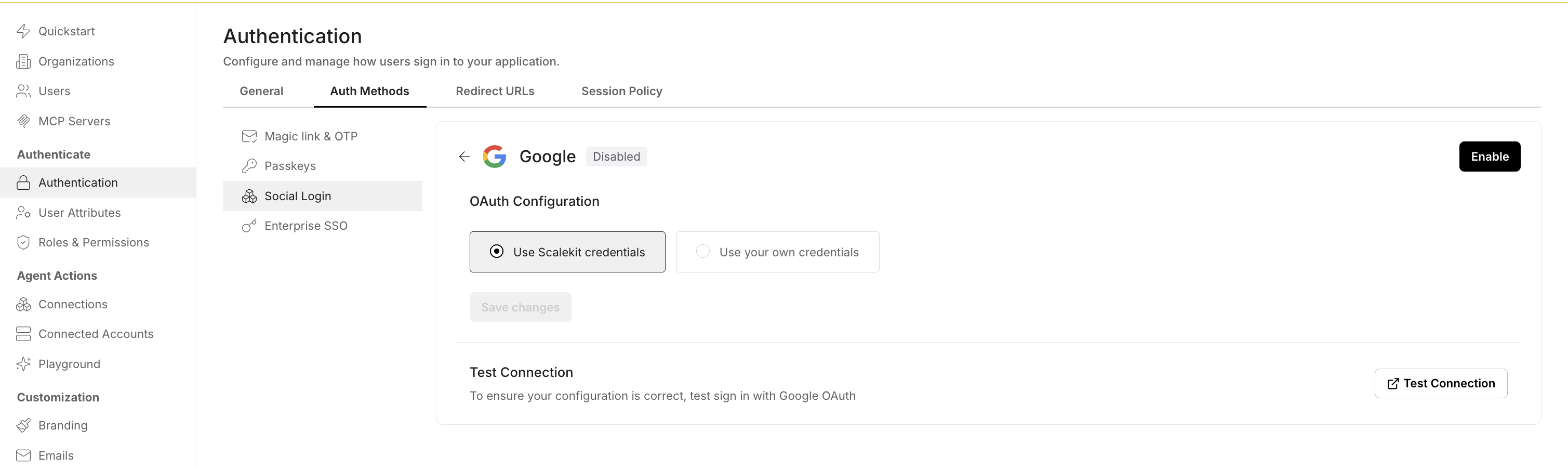
To configure the Google connection, open Dashboard -> navigate to the Authentication section -> select Auth Methods -> select Social Login, and click on the Edit button against Google.
-
You can select Use Scalekit credentials, or you can follow the on-screen instructions to bring your own Google credentials.
You have successfully implemented the social connection for your MCP server. Try running any of the example apps next.